• About
    • Resume
A Game Developer also plays some guitar

Category Archives: Ios

新浪微博API for MOAI

November 13, 2012 1:54 pm / 3 Comments / Benny Chen

最近一个星期干了一件事情,因为游戏的需要,为Moai引擎集成了新浪微博的API,这样也算为开源又一次出了份力。

最近一年基本上是游走于游戏的脚本层,很久没有碰引擎代码了,这一周的工作充满了怀旧感,虽然复杂度不算高,但还是勾起了不少当年开发游戏引擎的记忆。

check it out from https://github.com/bennychen/moai-dev, branch: sina_weibo

同时该branch也集成了另一位Moai开发者的截屏API, from http://getmoai.com/forums/post4555.html

如何使用[sample code]


MOAISim.openWindow ( "test", 320, 480 )

viewport = MOAIViewport.new ()
viewport:setSize ( 320, 480 )
viewport:setScale ( 320, 480 )

layer = MOAILayer2D.new ()
layer:setViewport ( viewport )
MOAISim.pushRenderPass ( layer )

gfxQuad = MOAIGfxQuad2D.new ()
gfxQuad:setTexture ( "moai.png" )
gfxQuad:setRect ( -64, -64, 64, 64 )

prop = MOAIProp2D.new ()
prop:setDeck ( gfxQuad )
prop:setLoc ( 0, 80 )
layer:insertProp ( prop )

font = MOAIFont.new ()
font:loadFromTTF ( "arialbd.ttf", " abcdefghijklmnopqrstuvwxyzABCDEFGHIJKLMNOPQRSTUVWXYZ0123456789,.?!", 12, 163 )

textbox = MOAITextBox.new ()
textbox:setFont ( font )
textbox:setRect ( -160, -80, 160, 80 )
textbox:setLoc ( 0, -100 )
textbox:setYFlip ( true )
textbox:setAlignment ( MOAITextBox.CENTER_JUSTIFY )
layer:insertProp ( textbox )

--MOAISinaWeiboIOS.init( "you app id", "you app secret", "your callback url" )

function openCompileDialog( txt, imgFileLoc )
	MOAISinaWeiboIOS.compileDialog( txt, imgFileLoc )
	MOAISinaWeiboIOS.setListener( MOAISinaWeiboIOS.DIALOG_POST_CANCEL_CLICKED, function()
		print( "user clicked cancel post" )
		MOAIFileSystem.deleteFile( imgFileLoc )
	end )
	MOAISinaWeiboIOS.setListener( MOAISinaWeiboIOS.REQUEST_RESPONSE_WITH_RESULT, function()
		print( "post successuflly" )
		MOAIFileSystem.deleteFile( imgFileLoc )
	end )
end


function test()
	local frameBounds={
		left=0, 
		top=0, 
		width=1024, 
		height=768
	}

    local tmpFilename=MOAIScreenShotIOS.snapshotToFile( MOAIScreenShotIOS.PORTRAIT, frameBounds )
    print( "Saved at location: ", tmpFilename );
	print( MOAIFileSystem.checkFileExists( tmpFilename ))

	if ( not MOAISinaWeiboIOS.isAuthValid() )
	then
		MOAISinaWeiboIOS.login()
		MOAISinaWeiboIOS.setListener( MOAISinaWeiboIOS.DIALOG_LOG_IN_CANCEL, function() 
			MOAIFileSystem.deleteFile( tmpFilename )
		end )
		MOAISinaWeiboIOS.setListener( MOAISinaWeiboIOS.SESSION_DID_LOGIN, function()
			print( "successfully logged in" )
			openCompileDialog( "test", tmpFilename )
		end )
	else
		print( "already logged in, post" )
		openCompileDialog( "test", tmpFilename )
	end
end

timer = MOAITimer.new()
timer:setSpan( 1 )
timer:setListener( MOAIAction.EVENT_STOP, test )
timer:start()
Posted in: Game Programming, iOS, Lua / Tagged: lua, Moai, weibo, 微博, 新浪

1st Day of Golden Week

October 1, 2011 11:51 pm / 4 Comments / Benny Chen

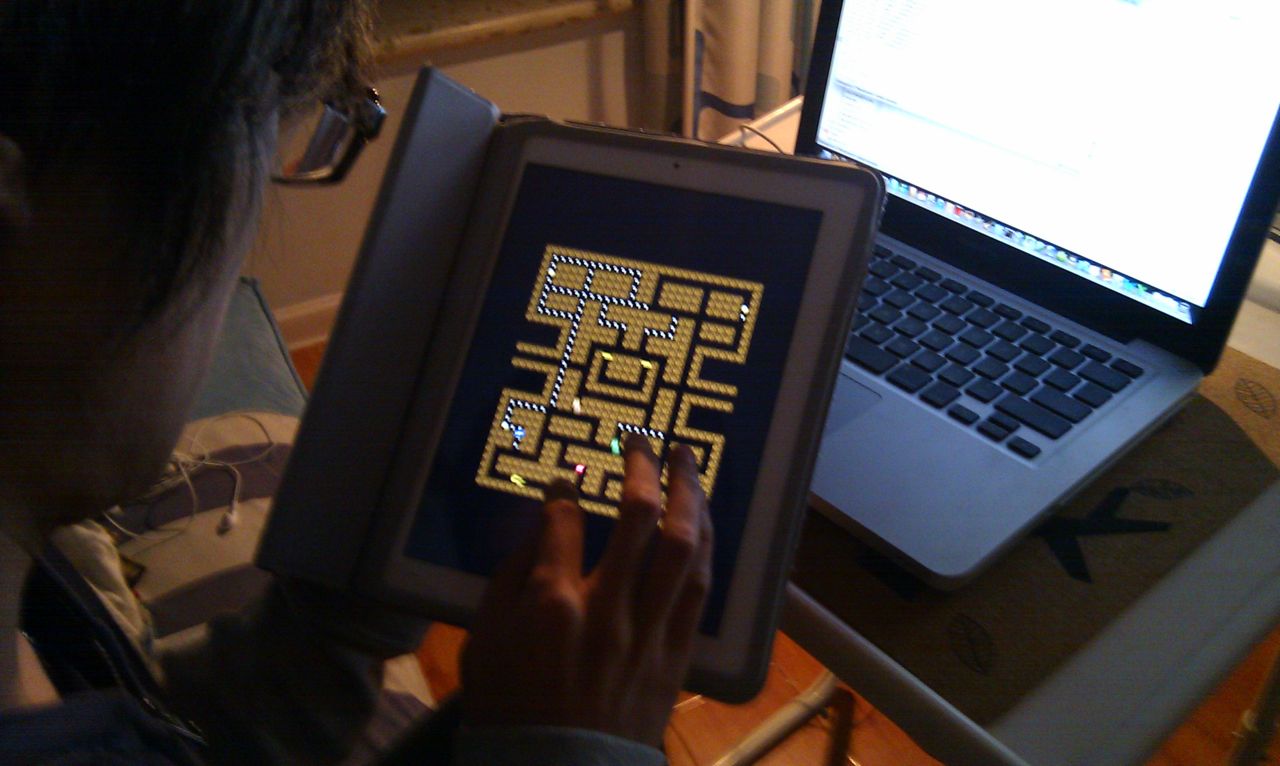
黄金周第一天,将之前开发的Pacman移植到了iPad上。因为Moai引擎,移植变得很容易,只需要把input层做一些修改。我的第一个iOS上的game demo就此诞生 😀

已经将代码更新到了github – https://github.com/bennychen/Moai-based-Pacman

Posted in: Game Programming, iOS, Lua / Tagged: ios, ipad, Moai, pacman

iOS开发与OpenGL ES相关问题整理(2)- 绘制图片上下颠倒

May 22, 2011 5:07 pm / 1 Comment / Benny Chen
  • 使用CGContextDrawImage绘制图片上下颠倒

  • 首先要说的是,在iOS的不同framework中使用着不同的坐标系:

    • UIKit - y轴向下
    • Core Graphics(Quartz) - y轴向上
    • OpenGL ES - y轴向上

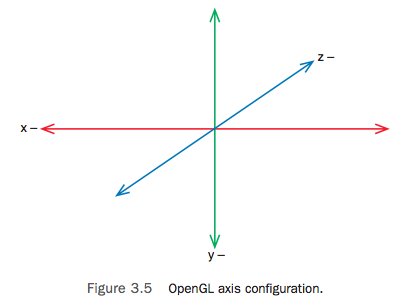
    UIKit是iPhone SDK的Cocoa Touch层的核心framework,是iPhone应用程序图形界面和事件驱动的基础,它和传统的windows桌面一样,坐标系是y轴向下的; Core Graphics(Quartz)一个基于2D的图形绘制引擎,它的坐标系则是y轴向上的;而OpenGL ES是iPhone SDK的2D和3D绘制引擎,它使用左手坐标系,它的坐标系也是y轴向上的,如果不考虑z轴,在二维下它的坐标系和Quartz是一样的。

    现在回到问题,当通过CGContextDrawImage绘制图片到一个context中时,如果传入的是UIImage的CGImageRef,因为UIKit和CG坐标系y轴相反,所以图片绘制将会上下颠倒。解决方法有以下几种,

    解决方法一:在绘制到context前通过矩阵垂直翻转坐标系

    // uiImage是将要绘制的UIImage图片,width和height是它的宽高
    CGContextTranslateCTM(context, 0, height);
    CGContextScaleCTM(context, 1.0, -1.0);
    CGContextDrawImage(context, CGRectMake(0, 0, width, height), uiImage.CGImage);
    

    解决方法二:使用UIImage的drawInRect函数,该函数内部能自动处理图片的正确方向

    // uiImage是将要绘制的UIImage图片,width和height是它的宽高
    UIGraphicsPushContext( context );
    [uiImage drawInRect:CGRectMake(0, 0, width, height)];
    UIGraphicsPopContext();
    

    解决方法三:垂直翻转投影矩阵
    这种方法通过设置上下颠倒的投影矩阵,使得原本y轴向上的GL坐标系看起来变成了y轴向下,并且坐标原点从屏幕左下角移到了屏幕左上角。如果你习惯使用y轴向下的坐标系进行二维操作,可以使用这种方法,同时原本颠倒的图片经过再次颠倒后回到了正确的方向:

    // uiImage是将要绘制的UIImage图片,width和height是它的宽高
    
    // 图片被颠倒的绘制到context
    CGContextDrawImage(context, CGRectMake(0, 0, width, height), uiImage.CGImage);
    
    // 设置上下颠倒的投影矩阵(则原来颠倒的图片回到了正确的方向)
    glMatrixMode(GL_PROJECTION);
    glLoadIdentity();
    glOrthof( 0, framebufferWidth, framebufferHeight, 0, -1, 1 );
    
    Posted in: Game Programming, iOS / Tagged: CGContextDrawImage, CoreGraphics, ios, opengles, UIKit, 上下颠倒, 坐标系, 方向

    iOS开发与OpenGL ES相关问题整理(1)

    May 22, 2011 2:21 pm / 1 Comment / Benny Chen

    在极其有限的工作日的晚上和周末进行着iOS上game programming的研究,进展非常缓慢,不过还是有必要将过程中的一些问题随时记录下来。

  • OpenGL ES崩溃在函数’glMatrixMode’

    这很有可能是因为在OpenGL ES2的context中使用OpenGL ES1的函数,ES1是固定函数渲染管线 (fixed function pipeline),而ES2是可编程的渲染管线 (programmable pipeline),ES2不再支持这些ES1的固定渲染管线的函数, 比如’glMatrixMode’。所以当ES2遇到这些不支持的ES1函数时,你的程序会收到一个’EXC_BAD_ACCESS’消息并且崩溃。通过gdb查看callstack,显示最后一个函数是gliUnimplemented:

    #0  0x0b05c0e5 in gliUnimplemented ()
    #1  0x00a1c6c3 in glMatrixMode ()
    

    如果一定要使用ES1函数, 你只能以ES1来初始化你的GL context:

    EAGLContext *aContext = [[EAGLContext alloc] initWithAPI:kEAGLRenderingAPIOpenGLES1];
    
  • 函数’pathForResource’返回nil

    需要将资源文件添加到项目的’Groups & Files’中

  • OpenGL ES崩溃在绘制函数’glDrawArrays’

    这可能是因为你启动了GL的某个渲染状态(比如vertex,color,texture coordinate等等,这里有所有可能状态的清单),但是却没有在绘制函数(比如’glDrawArray’)进行之前,设置该状态所对应的数据指针。

    比如说:

    glEnableClientState( GL_COLOR_ARRAY );
    glColorPointer( 4, GL_UNSIGNED_BYTE, 0, youColorArray );
    

    对于上面这两句代码,如果你设置了使用color数组,但是却没有设置color数组指针,在真正的绘制时你的程序就会因为找不到对应的指针而崩溃。同样的, 如果你调用了‘glEnableClientState(GL_TEXTURE_COORD_ARRAY), 则你也需要通过glTexCoordPointer()设置纹理坐标的数组指针,如此类推。

  • 怎么样通过OpenGL ES以像素为单位来绘制,而不是屏幕比例?

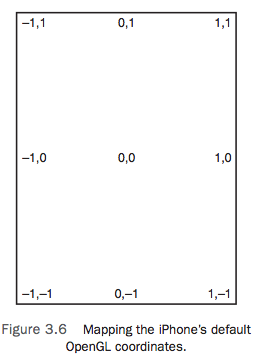
    在iPhone上通过OpenGL ES进行2D绘制时,默认的原点位置在屏幕中央,并且屏幕的坐标范围依次是从-1到1,不管是横轴还是纵轴。如下图所示,GL中的默认的单位1分别代表着屏幕长度和宽度的一半。

    图片来自book: ‘Learning iOS Game Programming_A Hands-On Guide to Building Your First iPhone Game’
    如果希望将原点移动到屏幕左下角,并且绘制时希望以像素为单位,只需要通过glOrthof函数将投影矩阵设置成一个垂直投影矩阵即可,代码如下:

    glMatrixMode(GL_PROJECTION);
    glLoadIdentity();
    glOrthof( 0, framebufferWidth, 0, framebufferHeight, -1, 1 );
    
  • Posted in: Game Programming, iOS / Tagged: glDrawArray, glMatrixMode, ios, opengles, pathForResource, 像素, 崩溃

    Game Framework的两种实现方式

    April 24, 2011 2:11 pm / Leave a Comment / Benny Chen

    一年多前,曾经写过一篇关于Game Engine Framework的文章,当时基本上是为了巩固并加深对framework的理解。最近又做了一些关于framework的工作,对于framework的实现方式又有了些新的认识。虽然我现在做的已经完全不是game了,不过方式对于game也同样适用。

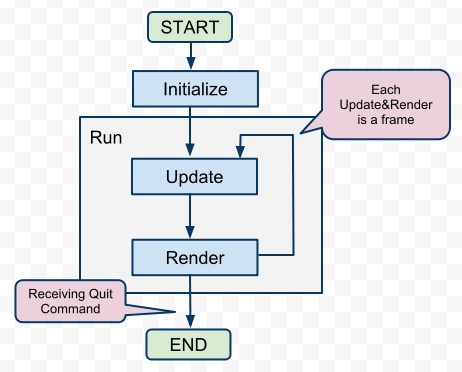
    这篇文章主要希望通过一些示例性的C++代码介绍game framework的两种实现方式。首先,我还是搬出一年多前的那篇文章里的game流程图,以下的一些代码也主要基于这张图实现。对于图的细节在这里不再赘述,可以再去翻看之前的那篇文章。

    FoC of Game

    1.通过继承

    这是一种最传统的方式了,之前我一直使用这种方式。基本上是提供一个基类,基类封装并决定了整个程序控制流,同时基于该控制流,基类提供了一系列的接口(在C++里是虚函数),以供继承类override,并实现定制化的行为。就像下面的这个Game类,run函数决定了整个程序的执行逻辑,同时initialize,update,render等非纯虚函数则提供了接口以供用户定制并实现具体Game想要的行为。

    // 通过继承来实现的framework
    class Game
    {
    public:
    	void run()
    	{
    		m_isQuit = false;
    		initialize();
    		while ( !m_isQuit ) 
    		{
    			handleInput();
    			update();
    			render();
    		}
    		destroy();
    	}
    	
    protected:
    	virtual void initialize() {}
    	virtual void update() {}
    	virtual void render() {}
    	virtual void destroy() {}
    	virtual void onMouse( Mouse mouse ) {}
    	virtual void onKeyboard( Keyboard keyboard ) {}
    	
    private:
    	void handleInput()
    	{
    		Event e;
    		while ( popEvent( &e )  )
    		{
    			switch ( e.type ) 
    			{
    			case EVENT_QUIT:
    				m_isQuit = true;
    				break;
    			case EVENT_MOUSE;
    				onMouse( e.mouse );
    				break;
    			case EVENT_KEYBOARD:
    				onKeyboard( e.keyboard );
    				break;
    			default:
    				break;
    			}
    		}
    	}
    	
    private:
    	bool m_isQuit;
    };
    

    在上面的代码中,我把实现全部写在了类的定义头文件中,在这里只是为了省事,在现实中你最好还是分开在.h和.cpp文件中。而且在这里,Game类还可以做的更多,我这里只是为了说明实现方式,所以依照前面的流程图而尽量让它简单。另外,不要纠结这段代码中的Event,Mouse,Keyboard等几个类和popEvent方法,它们只是我为了将故事说得更圆满一点而假象出来的几个类,我想你应该能猜到它们是用来干嘛的。

    基于此framework,一个具体的游戏只需要重写这些虚函数就可以了,像下面的这些代码。

    class ConcreteGame : public Game
    {
    private:
    	void initialize()
    	{
    		// do some real initialization
    	}
    	
    	void update()
    	{
    		// do some real update
    	}
    	
    	void render()
    	{
    		// do some real rendering
    	}
    
    	void destroy()
    	{
    		// do some real destroy
    	}
    	
    	void onMouse( Mouse mouse )
    	{
    		// handle mouse event
    	}
    	
    	void onKeyboard( Keyboard keyboard )
    	{
    		// handle keyboard event
    	}
    };
    
    int main()
    {
    	ConcreteGame mygame;
    	mygame.run();
    	return 0;
    }
    

    2.通过Delegation模式

    前一种方法有一个缺点,就是将程序的控制流和具体行为紧耦合在了一起,而且还必须使用继承,不易于扩展。现代软件设计的一些方法告诉我们,要尽量使用接口,且尽量使用组合而非继承。Delegation模式就可以帮我们达到这一目的。

    何为Delegation模式,wiki上的解释一语中的:

    Delegation is the simple yet powerful concept of handing a task over to another part of the program.

    Delegation将一些task委托给程序的另外一部分来处理,以达到了行为使用者和具体行为的松耦合。

    以下是通过Delegation模式重新实现的framework。

    // 通过Delegation模式来实现的framework
    class GameDelegation
    {
    public:
    	virtual void initialize() {}
    	virtual void update() {}
    	virtual void render() {}
    	virtual void destroy() {}
    	virtual void onMouse( Mouse mouse ) {}
    	virtual void onKeyboard( Keyboard keyboard ) {}
    };
    
    class Game
    {
    public:
    	Game( GameDelegation *gameDelegation )
    	{
    		m_gameDelegation = gameDelegation;
    	}
    	
    	void run()
    	{
    		m_isQuit = false;
    		if ( m_gameDelegation == NULL )
    		{
    			return;
    		}
    		
    		m_gameDelegation->initialize();
    		while ( !m_isQuit ) 
    		{
    			handleInput();
    			m_gameDelegation->update();
    			m_gameDelegation->render();
    		}
    	}
    	
    private:
    	void handleInput()
    	{
    		Event e;
    		while ( popEvent( &e ) )
    		{
    			switch ( e.type ) 
    			{
    			case EVENT_QUIT:
    				m_isQuit = true;
    				break;
    			case EVENT_MOUSE;
    				m_gameDelegation->onMouse( e.mouse );
    				break;
    			case EVENT_KEYBOARD:
    				m_gameDelegation->onKeyboard( e.keyboard );
    				break;
    			default:
    				break;
    			}
    		}
    	}
    	
    private:
    	bool m_isQuit;
    	GameDelegation *m_gameDelegation;
    };
    

    基于此framework,当需要具体实现一个游戏的时候,只需要实现GameDelegation接口即可,然后将Game类的GameDelegation设置为你所实现的具体的ConcreteGameDelegation类,代码如下。

    class ConcreteGameDelegation : public GameDelegation
    {
    public:
    	void initialize()
    	{
    		// do some real initialization
    	}
    	
    	void update()
    	{
    		// do some real update
    	}
    	
    	void render()
    	{
    		// do some real rendering
    	}
    
    	void destroy()
    	{
    		// do some real destroy
    	}
    	
    	void onMouse( Mouse mouse )
    	{
    		// handle mouse event
    	}
    	
    	void onKeyboard( Keyboard keyboard )
    	{
    		// handle keyboard event
    	}
    };
    
    int main()
    {
    	ConcreteGameDelegation myGameDelegation;
    	Game mygame( &myGameDelegation );
    	mygame.run();
    	return 0;
    }
    

    最近我正好做了一些iOS上开发的研究,发现Delegation在iOS框架中被普遍使用。比如,iOS中的每个应用程序对应的是一个UIApplication类,为每一个UIApplication,开发人员必须要实现一个特定的UIApplicationDelegate,并将它指定给当前的应用程序(在main函数中通过UIApplicationMain函数指定,或者是在nib文件中绑定)。在这个UIApplicationDelegate类中,开发人员就需要重写诸如didFinishLaunchingWithOptions,applicationWillTerminate这样的方法,就类似与上面game framework中的initialize,destroy等方法。当然iOS框架要复杂很多,它还用到其它一系列的设计模式,有空研究些这样设计是非常有趣的。

    图片来自于这篇苹果官方关于iOS中delegation的介绍:http://developer.apple.com/library/ios/#documentation/General/Conceptual/DevPedia-CocoaCore/Delegation.html

    Posted in: C++, Game Programming, iOS / Tagged: C++, delegation, framework, game, 实现, 继承

    Simulator无法运行OpenGL ES程序

    April 23, 2011 9:32 pm / 4 Comments / Benny Chen

    新买了MBP,在上面下载并安装了Xcode3.2.6,终于算是迈出iOS game development的第一步。由于现在工作已经基本跟game毫不相干,只有周末才有时间搞点自己的研究了:-(

    在Xcode里新建第一个项目,基于模板“OpenGL ES Application”。不用写任何一行代码,iOS SDK已经为我们创建了一个可以运行的OpenGL应用程序了。从工具栏上点击“Build and Run”(或者通过command+return快捷键),试图启动运行程序。但诡异的是,无论怎样,程序都是一启动,闪动一下就退出了。

    打开console(菜单->Run->Console),报出一大串的错误:

    LLVM ERROR: Cannot yet select: 0x900cd10: v4i32 = bit_convert 0x9013b50 [ORD=129] [ID=69]
    ……
    ……
    Failed to launch simulated application: Unknown error.

    由于完全是个iOS新兵,花了好一段周折才解决,解决办法:

    1.从Groups&Files的Targets下选择你的项目的target;
    2.从工具栏点击“info”按钮,设置target属性;
    3.将Build->Deployment->iOS Deployment Target从iOS 4.3改为iOS 4.2;
    4.回到Xcode主界面,从工具栏的Overview下拉列表中,可以发现,多出了simulator 4.2的项(原来只有4.3),勾选iPhone Simulator 4.2或者iPhone Simulator 4.3;
    5.再次运行程序,跳动的彩色小方块终于出来了。

    在Project的info中也可以设置iOS Deployment Target,但是在target level设置的优先级会更高,且一个项目可以有多个target。

    这应该是Apple的一个bug,iOS4.3太新了。不过这个错误只有OpenGLES的程序才会有,普通程序没有这个错误。Apple每更新一个新版本的iOS,对于开发人员来说,我想或多或少都会带来一定程度的pain。

    Posted in: iOS / Tagged: LLVM ERROR, opengles, simulator, xcode, 不能运行

    LinkedIn

    Milan Petrovic

    Categories

    • In My Life (25)
      • A Day in the Life (8)
      • English Learning (2)
      • Learn a Word (7)
      • Something In The Way (8)
    • Music Heaven (8)
      • Guitar (1)
      • In Concert (1)
      • Lyrics (3)
    • OK Computer (54)
      • 3D (3)
      • C++ (10)
      • Computer Graphics (15)
      • Game Programming (23)
      • iOS (6)
      • Linux (1)
      • Lua (9)
      • My Projects (3)
      • Some Experiences (9)
      • Talking in Code (2)
      • Unity (2)
    • Quotations (2)
    • Uncategorized (1)
    • Visca Barça (24)
      • FCB BJ (5)

    Recent Posts

    • [译]优化你的手机游戏(没有延迟的,才是健康的)- 一篇给游戏美术设计师读的文章
    • 新浪微博API for MOAI
    • 稍后继续
    • Unity Developer ++
    • Another Thread @ Moai Forum
    • 1st Day of Golden Week
    • 为SyntaxHighlighter添加新语言
    • 基于Lua的State Pattern
    • Class Diagram of Pacman
    • 基于Moai的Pacman

    Recent Comments

    • 约修亚_RK on 为SyntaxHighlighter添加新语言
    • 爱装的小男孩 on 小心DLL链接静态库时的内存错误
    • happyfire on Game Loop的几种实现方式
    • William on 新浪微博API for MOAI
    • Benny Chen on 新浪微博API for MOAI
    • your man on 新浪微博API for MOAI
    • 你家男人 on 稍后继续
    • 逍遥 on 关于对std::vector的遍历
    • papa on Unity Developer ++
    • T客网 ︱ Techpot » Blog Archive » iOS开发与OpenGL ES相关问题整理(1) on iOS开发与OpenGL ES相关问题整理(1)

    Tags

    2d 3D 3dsmax 3ds max air Apply architecture Asia tour barca Beijing bilbao binary search blocked bob boost bruce springsteen C++ capo CGContextDrawImage Champions League Change DLL DX10 eval exporter flash framework frustum culling game game engine iniesta ios linux lua Moai opengles pacman plug-in plugin 北京 导出插件 崩溃 巴萨 游戏引擎 踢球
    © Copyright 2026 - A Game Developer
    Infinity Theme by DesignCoral / WordPress