• About
    • Resume
A Game Developer also plays some guitar

在Moai Forum的问题帖

August 21, 2011 10:26 am / Leave a Comment / Benny Chen

(关于Moai,见我的上一篇文章。)

下面贴出在Moai Forum上我最近的两个问题帖。回答者都是Patrick,他是Moai引擎的领导者,同时也是’Zipline Games’的CTO。他似乎是个不错的人,在我每次贴出问题后,总是在最快的时间内解答。

1. Does MOAILayer2D only support 512 props maximumly?

http://getmoai.com/forums/moai-sdk-developer-support/does-moailayer2d-only-support-512-props-maximumly/

Me:

I was trying to put lots of props onto a layer with function MOAILayer2D:insertProp, but found that if I inserted more than 512 props, all the props will fail to render on the layer. Is 512 the threshold for a layer’s prop count? Why is it a restriction? 512 doesn’t suffice my need. If there did exist a restriction, Moai even didn’t tell me any info or warning about the number 512, it took me lots of time to detect the problem and the number… 🙁

Patrick:

Sorry you had to spend your time on that. I agree that we could emit better warnings for situations like that.

The 512 restriction is arbitrary. It’s the size of the buffer created on the stack to sort the prims. I can fix it for you in the next release – will grow the buffer dynamically instead. When I have time to add an option to disable sorting by MOAILayer2D, the buffer won’t be needed at all.

If you need a fix immediately and are building from source, you can go into MOAILayer2D and just change it to something else.

(512 props is a lot! Is this for a mobile game? Mind if I ask what you’re displaying? Depending on what it is, may be other ways I can help.)

Patrick:

OK. I removed MAX_RENDERABLES and now use a flexible size buffer to gather and sort the props returned from the partition. That will be in the upcoming release. Try it out and let me know.

If you run into stuff like this in the future (any kind of odd or mysterious behavior) please let me know and I’ll hop right on it. Would much rather deal with a few false positives than have you waste your time!

Me:

Thanks so much for your reply and help, Patrick.

I’m just new to Moai. I was generating and displaying a map (31×28 grids) with each grid empty or filled with a type of sprite (like a the Pacman game, each grid could be filled with a Wall or a Bean or …). So this is why I used so MANY props. Do you have some other way or suggestions for generating such kind of game maps, so that not that many props will be used?

As you’ve fixed this issue, so I’m looking forward to the next release. Thanks a bunch!

Patrick:

Absolutely. Check out MOAITileDeck2D and MOAIGrid. Any of the deck types can be used in conjunction with a grid, but MOAITileDeck2D is ideally suited. The grid draws with one transform (from the prop it’s attached to) and also gets viewport culled on a per tile basis. It’s ideally suited to tiled backgrounds. You will get way better performance and can also update the grid values at runtime or animate them using a MOAIDeckRemapper. Check out tilemap-animated for a sample. In the games we are working on in-house we have multiple layers of tilemap parallax drawing hundreds and hundred of tiles at really good frame rates. If you need to animate a tile flipping or rotating (like what happens to a block in a Mario game when Mario hits it with his head), just hide the original tile in the grid and replace it with a prop – you can use the same tile deck as the source for the prop.

Also, can’t say enough good things about Tiled (mapeditor.org). The latest version supports flip flags and can output its data as Lua tables you can then load in to Moai (with a little bit of work).

Always a pleasure to help out, so let me know if you have more questions as you go.

Me:

Oh, how stupid I was that I didn’t find these classes, I will try these MOAI classes later. THANK YOU!

2. Questions about MOAIAction:stop

http://getmoai.com/forums/moai-sdk-developer-support/questions-about-moaiactionstop/

Me:

I have some questions regarding the usage of MOAIThread and MOAIAction

Firstly check out the code snippets below.

MOAISim.openWindow ( "test", 320, 480 )</span>
viewport = MOAIViewport.new ()
viewport:setSize ( 320, 480 )
viewport:setScale ( 320, 480 )

layer = MOAILayer2D.new ()
layer:setViewport ( viewport )
MOAISim.pushRenderPass ( layer )

gfxQuad = MOAIGfxQuad2D.new ()
gfxQuad:setTexture ( "cathead.png" )
gfxQuad:setRect ( -64, -64, 64, 64 )

prop = MOAIProp2D.new ()
prop:setDeck ( gfxQuad )
layer:insertProp ( prop )

function moveThreadMain()
	movingAction = prop:moveLoc( 1000, 0, 100, MOAIEaseType.LINEAR )
	local x
	local y
	while ( movingAction:isBusy() )
	do
		x, y = prop:getLoc()
		print( "current x - " .. x )
		coroutine.yield()
	end
end

isCrossBound = false
function checkThreadMain()
	while ( true )
	do
		local x
		local y
		x, y = prop:getLoc()
		if ( isCrossBound == false )
		then
			if ( x > 20 )
			then
				isCrossBound = true
				movingAction:stop()
				print( "x after stop current frame - " .. x )
			end
		else
			print( "x after stop next frame - " .. x )
			break
		end
		coroutine.yield()
	end
end

moveThread = MOAIThread.new()
checkThread = MOAIThread.new()
moveThread:run( moveThreadMain )
checkThread:run( checkThreadMain )

I start and run 2 threads. The ‘moveThread’ uses MOAIAction to move the prop continuously and print its location each frame, while another ‘checkThread’ checks if the prop crosses some bound and if yes stops the moving animation with function MOAIAction:stop

But the result of MOAIAction:stop differs based on the launching sequence of those above 2 threads.

If I run ‘checkThread’ before ‘moveThread’, here is the result. MOAIAction::stop successfully stopped moving prop.

x after stop current frame – 20.099973678589
x after stop next frame – 20.099973678589

But if I run ‘movingThread’ before ‘checkThread’, I will get the following result, seems that animation will continue running for another frame

x after stop current frame – 20.099973678589
x after stop next frame – 20.199974060059

This really confuses me. Can anyone do me a favor to explain at which condition MOAIAction will run an additional frame after stopped, and when not? Is there a way to ensure that MOAIAction:stop will run no more frame no matter the running sequence of MOAIThread?

Patrick:

Just ran your code. It’s a legitimate bug in the way the MOAIAction update loop works. I’ve fixed it and checked it in to ‘master’ on moai-dev. We should have the next binary release out early next week.
Thanks for finding this!
Posted in: Game Programming / Tagged: 2d, forum, game engine, Moai, MOAIAction, MOAILayer2D, MOAIThread

Moai

August 21, 2011 10:24 am / Leave a Comment / Benny Chen

最近通过澳洲朋友Andrew的介绍,开始使用了一款正在开发中的开源游戏引擎Moai – the mobile platform for pro game developers.

Moai是一款由’Zipline Games’公司开发的2D游戏引擎,我写这篇文章时的版本是0.5 Beta。它最大的特点就是集成了Lua脚本语言,它提供了一系列class-based的Lua API。开发者一般只需要通过写Lua脚本,即可实现一款游戏。而引擎本身解决了跨平台的问题,开发完的游戏可以顺利的发布到iOS和Android平台。而引擎本身提供的功能上,也基本上覆盖了需要开发一款2D游戏所有的元素,设备和输入,2D Sprite,动画,字体,粒子系统,物理,声音等。Moai的另外一个重要特色是提供了一个它称之为Moai Cloud的云服务,对于这个我还没有深研究,不过据称它可以让需要后端server的游戏变得简单,用户同样只需要用Lua来编写server的逻辑代码,而至于像scale-up这样的问题完全可以交给Moai引擎来处理。

然而开源引擎,尤其是处于Beta测试中的开源引擎,想用于开发正式的游戏确实有些不可靠。我最近在把之前写过的一个Pacman 2D移植到Moai上,但是遇到了很多的问题,并且一些问题最终通过层层纠结后证实是引擎本身的问题。虽然过程坎坷,但因为参与开源引擎项目,并有了自己的contribution,这本身着实是一件令人欣慰而振奋的事情。

但是希望Moai的开发者们work harder,让Moai尽快变得更好 😀

注册并获取Moai:http://dashboard.moaicloud.com/

Moai入门文章:
第一部分:http://getmoai.com/2011/04/moai-basics-part-1/
第二部分: http://getmoai.com/2011/04/moai-basics-part-2-2/

Moai API Documentation:http://getmoai.com/docs/

Posted in: Game Programming / Tagged: 2d, beta, cloud, game engine, lua, Moai, mobile, zipline games, 开源

Last Working Day@IBM

August 19, 2011 11:37 pm / 1 Comment / Benny Chen

一段两年的旅行今天画上了句号,这是一个终点,但又是一个全新的开始…

Posted in: A Day in the Life, Something In The Way

Game Loop的几种实现方式

June 19, 2011 11:37 pm / 2 Comments / Benny Chen

写这篇博客的目的是为了对game loop(游戏主循环)做一个全面的总结和介绍,包括它的定义,与之相关的专业术语(terminology),以及最重要的,对它的几种实现方式,从代码层次做一些介绍以及优缺点分析。

1.什么是Game Loop

对任何一个游戏开发者来说,game loop都应该不是一个陌生的概念。任何一款游戏都会有一个自己的game loop,它是整个游戏的核心,是游戏的心脏。具体什么是game loop,这是来自于Game Engine Architecture[2]上对于game loop的定义:game loop是对于一个游戏(或者一个游戏引擎)的所有子系统(subsystem)的周期性的更新。一个游戏会包含各种不同的子系统(比如渲染,物理,动画,AI等等),这些不同的子系统负责处理不同的游戏任务,game loop的实现方式就决定了这些子系统的任务执行的组织方式。而这些就决定了整个游戏的基础架构,同时也将决定game在不同的机器上将如何运行,在下面介绍game loop的不同实现方式时会对此有详细介绍。

game loop中所处理的逻辑和操作包罗万象,但一般可抽象为以下这几种模块:

  • 处理输入:这些输入包括,来自于交互设备(键盘,鼠标,游戏控制器等等)的输入,来自于网络的输入;
  • 系统更新(update):(根据输入或者自发的)对各个子系统进行更新,以决定当前的游戏状态;
  • 渲染(render):对整个游戏场景进行渲染。

所以一个最最简单的game loop可以抽象为如下的这些伪代码:

while ( game is running )
{
	processInput();
	update();
	render();
}

2.相关术语

常常和渲染紧密相连的一个参数是FPS(frame per second),它指的是每秒显示设备在屏幕上进行绘制的频率。对于游戏来说,一般50-60的FPS是最优,最低也不要低于16帧[1]。游戏中还有一个容易被忽略的重要参数可以被称为游戏速度(game speed)[3],它指的是游戏状态每秒被更新的次数,容易与FPS混淆。一个通俗的理解和区别它们的方式可以是,FPS是render函数被调用的频率,而game speed则是update函数被调用的频率。

游戏是对实时性(real-time)要求很高的系统,所以在game loop中,time是尤其重要的一个因素。这里需要说的是,游戏中会包含好几种不同的时间,这些时间有着各自的时间线(timeline),并且在游戏中发挥着各自不同的重要作用[2]。

  • 系统的真实时间(real time)。真实时间一般在操作系统被定义为从过去某个固定时间点(比如常见的一个时间点被称之为Epoch, 是1970年1月1日的0:00:00, UTC时间)到当前点总共逝去的时间。
  • 游戏时间(game time)。一般情况下,游戏时间等于系统时间。但在某些特殊情况下,游戏时间可以发挥不同的作用:比如在游戏暂停的时候,需要停止更新游戏时间;在游戏需要以慢速运行时,可以用比真实时间低的频率来更新游戏时间,这在我们需要进行一些游戏调试的时候,尤其有用。下面会介绍到,一个好的game loop结构,可以有助于游戏调试,这对开发人员来说是非常重要的。
  • 局部时间线(local timeline)。不管是一个动画,还是一个音频或者视频片段,都会有一个局部时间线。通过将此局部时间线以不同的方式映射到全局的时间线,可以灵活的控制片段以特定的方式进行播放。[2]
  • 帧时间(frame time)。两次帧循环之间所间隔的时间,具体可看本文章的3.2.1节。

3.Game Loop的实现方式

OK,介绍了这么多跟game loop相关的概念,接下来进入正题,game loop的各种实现方式大盘点。

有一点需要强调的是,game loop在单线程的游戏系统中是一种情况,而在多线程的系统中又是另一个不同的故事。多线程对于系统会引入异常的复杂性,关于这个,可以看我之前的一篇关于游戏引擎多线程的文章:http://www.bennychen.cn/2011/01/关于游戏引擎多线程的一些整理和思考/。相比来讲,单线程要简单很多,这篇文章里以下的一些game loop的实现方式也主要是针对在单线程环境中的。

在单线程环境中,game loop按照实现方式可以分为以下这几种类型:

  • 基于帧的(frame-based)game loop
  • 基于时间的(time-based)game loop
    • 可变频率(variable-step)game loop
    • 固定频率(fixed-step)game loop

3.1 基于帧的(frame-based)game loop

这是一种最简单的game loop,就如上面文章刚开始的伪代码所描述的一样,在这种结构下,游戏只是重复的不间隔的进行processInput,update,render操作。可以看到,这种game loop的实现异常简单,但缺点也是异常明显的。因为它缺少了一个很重要的控制因素——时间,所以在不同配置的机器环境下,游戏将以不同的速度运行。比如说,游戏中的一个物体,在每次的update操作中将它的位移增加5(单位可以是米,英尺,像素,或者其它某种单位,每个游戏都使用一个特定的距离单位):

void update()
{
	object.position += 5.0f;
}

在一个较快速的机器上,update被执行的次数会更多,所以物体移动的速度就会更快,这就导致了游戏在不同机器运行速度的不一致,这是不能接受的。

优点:简单;
缺点:在不同机器上,游戏的运行速度不一致。

3.2 基于时间的(time-based)game loop

为了让不同机器的游戏运行速度一致,就需要引入时间,这就带来了基于时间的game loop实现方式。这种方式下,又可以分为两种,可变频率(variable step)的和固定频率的(fixed step)。在[5]中,这两种方式则分别被称为可变间隔的(variable interval)和固定间隔的(fixed interval)。

3.2.1 可变频率的game loop
这种方式的实现只需要为update函数引入一个时间参数elapsedTime即可,elapsedTime指的是从上一次loop的执行到当前loop所过去的时间,通常称之为帧时间(frame time),或者time delta。它的单位一般使用毫秒,这是在游戏中进行时间相关操作所使用的标准单位[2],当然其它比如在做profiling时为了计算某个函数的执行时间,则用的是机器周期(machine cycle)这样更精确的时间机制。

这是这种game loop实现的伪代码,也非常简单:

lastFrameTime = getCurrentTime();
while ( game is running )
{
	processInput();

	currentFrameTime = getCurrentTime();
	elapsedTime = currentFrameTime - lastFrameTime;
	update( elapsedTime );
	lastFrameTime = currentFrameTime;

	render();
}

这时,再看前面的那个例子,对游戏中的一个物体,在每次的update操作中不是将它的位移绝对增加5,而是要乘以时间这个因子,这样5实际代表的是物体的速度。速度乘以时间,就得到了物体在这段时间内的位移:

void update( float elapsedTime )
{
	object.position += 5.0f * elapsedTime;
}

这样就解决了在不同配置的机器上运行速度不一致的问题。因为在更快的机器上,update执行的频率高,但frame time的间隔时间较短,所以物体位置更新的频率高,但每次更新的位移幅度小。反之,在较慢的机器上,update函数的执行频率较低,但frame time间隔时间较长,则每次物体将以较大幅度的更新位移。正是因为引入了时间因素,所以在不同配置的机器上,游戏的运行速度将会看起来一致。

不过这种game loop在实现时需要解决一个长时间暂停的问题,所以我们在暂停时,要同时停止更新游戏时间,以免在暂停后恢复时,将得到一个超级大的elapsedTime值。

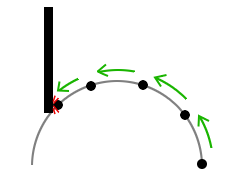
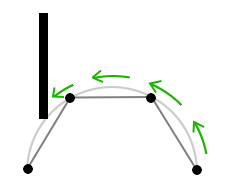
但随之而来,这种game loop实现方式的缺点也暴露出来了。比如考虑这样一种场景,物体绕着一个弧形的轨迹进行移动。在正常的速率下,物体的运行轨迹几乎是弧形的。如下图,图片来自于[5]。

但是在较慢的机器上,虽然物体的移动位置点能保持同步,因为更新的频率较低,物体的移动轨迹就变得非常离散,以至于不是按照一个弧形在移动,如下图。

其它的效果也有类似的问题,比如说动画,虽然说动画的播放速率是一致的,但是在较慢的机器上,会出现比较严重的掉帧现象,这就是我们俗称的“卡了”。再比如说物理,在一个正常的机器上,一个障碍物能够完美的被避开,但在一个较慢的机器上,这就不好说了。

对于这种game loop,就算是较快的机器上,也是有问题的,虽然好像update被执行的越快越多,游戏运行的就越流畅,用户的体验应该越好才对。但其实不然,两点原因,首先就算在较快的机器上,也可能会遭遇到运算的高峰期,这时由于对比明显,游戏性能的下降会非常明显,游戏用户就很容易察觉到这种性能降级(performance degradation),这并不是好的体验;再一点,对于手机等移动设备上的游戏,update速率执行过快不是好事,这对电池是一种消耗。事实是,游戏只需要一定范围内的update频率就可以达到流畅而令用户接受的效果。

优点:简单且不同机器上的游戏运行速度是一致的;
缺点:在较慢的机器上,物体的更新频率慢会导致各种效果失真(distortion);在较快的机器上,更新太快的话会更容易让用户察觉到性能降级,且对于移动设备,更新太快会降低电池的使用时间。

3.2.2 固定频率的game loop
由此,为了解决上面的问题,就有了这种固定频率的game loop,让游戏的更新速度保持在一个特定的恒定值。比如下面的这段伪代码,让游戏恒定运行在FPS(或者game speed,此时FPS等于game speed)为25的速度下。代码参考自[3]。

#define FRAME_RATE 25
#define FRAME_TIME ( 1000 / FRAME_RATE )

nextFrameTime = getCurrentTime();
while ( game is running )
{
	processInput();
	update( FRAME_TIME );
	render();

	nextFrameTime +=  FRAME_TIME;
	currentFrameTime = getCurrentTime();
	if ( nextFrameTime >= currentFrameTime )
	{
		sleep( nextFrameTime - currentFrameTime );
	}
	else
	{
		// 我们已经跟不上帧速率了
	}
}

可以看到,如果一次loop执行完的持续时间小于固定帧时间,则直接让主线程sleep即可。但是如果在较慢的机器上(或者是设定的固定帧速率过高),执行完一帧的时间会超过固定帧时间,导致无法达到所目标的帧速率,则只能忍受这种情况了。最差情况下,如果在某一时期内游戏遭遇到了非常巨大的运算压力,则游戏将会变得异常缓慢到无法忍受的地步。

保持固定的更新频率有一个非常重要的优点,因为它带来了游戏执行的确定性(game execution determinism)[1],所以以这种机制所实行的game loop可以被称为确定性的game loop(deterministic game loop)。反之,可变频率的game loop则是非确定性的(non-deterministic),因为它依赖于系统每一帧运行的时间,这在游戏每次运行时是变化不定的,这就导致游戏的行为也是不定的。

确定性机制能够为系统带来一个非常重要的特点——录制和回放功能(record and replay)[2]。所谓录制回放功能,就是能够将玩家在进行游戏的时候的各种操作记录下来,以便在下一次运行时,就能够通过回放将游戏以同样的方式执行。这会成为一个很好的debugging工具,因为通过回放功能,会让一些难以发现的bug得以轻而易举的复现,这是非常珍贵的。甚至我们还可以支持单步调试(single-stepping)功能[2],单步调试指的是当游戏处于暂停状态时,可以通过某个按键,让游戏一次执行一个frame time,这在调试游戏时都是非常有用的。

这种game loop还是有一个问题,它紧耦合了update和render的执行频率,update的频率(即game speed)保持在25基本能满足游戏运行的流畅需求,但让render的更新频率(即FPS)也保持在25,对于配置好的机器实在是有些浪费,我们可以让渲染的更快,以获得更好的画面效果。

优点:在不同机器上游戏效果一致,同时为游戏带来确定性。
缺点:一个更好的机器并不能带来更好的游戏画面,扩展性(scalability)差。

3.2.3 获得最大FPS的固定频率的game loop
解决上一个game loop缺点的办法就是解耦update和render,让它们以各自不同的频率运行。这就带来了这个固定频率的game loop的变种,称之为“获得最大FPS的固定频率的game loop”(Constant Game Speed with Maximum FPS)[3]。

同时这种方法还处理另一个问题,当update处理时间过久时,这种game loop会暂时不进行render而再次update。换言之,当update执行时间长于所期望的帧时间时,游戏会丢弃绘制帧并调用额外多次update函数,以让游戏从一个慢速(slowdown)状态中追赶上并恢复过来[4]。

这是该game loop的代码:

#define MAXIMUM_FRAME_RATE 45;
#define MINIMUM_FRAME_RATE = 15;
#define UPDATE_INTERVAL ( 1000 / MAXIMUM_FRAME_RATE )
#define MAX_CYCLES_PER_FRAME ( MAXIMUM_FRAME_RATE / MINIMUM_FRAME_RATE )

nextFrameTime = getCurrentTime();
while ( game is running ) 
{
	loops = 0;
	while( getCurrentTime() > nextFrameTime 
		  && loops < MAX_CYCLES_PER_FRAME ) 
	{
		update( UPDATE_INTERVAL );
		nextFrameTime += UPDATE_INTERVAL;
		loops++;
	}

	render();
}

从上面的代码中看出,当出现update处理时间过久时,game loop并不是一直重复执行update而不渲染,update频率被控制在15-45之间,所以在一次while循环中,最多只会执行3次update(MAX_CYCLES_PER_FRAME=MAXIMUM_FRAME_RATE / MINIMUM_FRAME_RATE=45/15)。

当然FPS也不总是可以为任意值,有时为了解决显示设备上的一种叫做tearing[2](屏幕的上半部分显示的是上一帧的画面,而下半部分是当前帧的画面)的问题,需要将FPS设置为显示设备刷新频率的倍数。在手机等这种移动设备上,同样为了省电,也需要将FPS固定在一个恒定值。但不管怎样,update和render仍然是以各自不同的频率运行。最近在读的一本关于iOS游戏开发的书上[6]的game loop,作者使用的就是这种game loop,它的game speed被设置在15-45,而FPS则采用的是iOS上默认的60(iOS上使用CADisplayLink的frameInterval属性来设置绘制帧率,frameInterval默认是1,表示显示1秒钟会被刷新60次)。

优点:拥有固定频率的game loop的优点,同时解耦update和render,并且当帧速率降低时,可以通过丢弃绘制帧来保持游戏的速度;
缺点:在高配置的机器上依然有些浪费资源。

3.3 其它方式

game loop还可以有更多的变化,比如在[1]中提到,对于游戏中的不同子系统,update的频率也是不一致的。比如,为了获得很好的动画效果,需要一个较高的频率来更新动画,而对于AI系统,用同等高频率的速度来更新就是浪费计算资源了。所以这篇文章提出了一种更好的update机制,将update分隔为两部分,一部分以最快的速度运行,而另一部分以某种预设的固定频率运行。

在[3]中提出,为了获得一种更平滑的画面效果,可以对frame-time进行插值(interpolate),并且为update函数提供预测函数(prediction function)。

4.总结

一个看似简单的game loop,也可以有这么多的变数。这篇文章主要基于时间因素列出了4种实现方式:第1种是基于帧的game loop,一般而言要避免采用这种方式,而应该选用后面3种基于时间的game loop。基于时间的可变频率的game loop是一种常见的实现方式,不过为了获得稳定的画面效果和游戏运行的确定性,可以使用固定频率的game loop。最后还可以将update和render解耦以各自频率运行,以获得最优的组织结构运行游戏。

OK,这里就是我有史以来最长的一篇博客的结尾。

5.参考

[1]LUIS VALENTE, Real Time Game Loop Models for Single-Player Computer Games
[2]Jason Gregory, Game Engine Architecture
[3]http://www.koonsolo.com/news/dewitters-gameloop/
[4]http://msdn.microsoft.com/en-us/library/bb203873.aspx
[5]http://sacredsoftware.net/tutorials/Animation/TimeBasedAnimation.xhtml
[6]Michael Daley, Learning iOS Game Programming - A Hands-On Guide to Building Your First iPhone Game

Posted in: Game Programming / Tagged: game, loop

3ds-max-exporter-plugin

June 15, 2011 9:50 pm / 1 Comment / Benny Chen

把两年前的那个3ds max导出插件项目上传到了google code,代码基本上已经能嗅到铁锈的味道了。现在再上传,一来作备份,二来open source是一件光荣的事情,或许会有人需要它。

地址:

http://code.google.com/p/3ds-max-exporter-plugin/

介绍:

This project was developed with 3DS Max 9 SDK in C++, Visual Studio 2005. This exporter plug-in is aimed to export 3D mesh data from 3DS Max into a predefined file format. These mesh data includes vertices, texture, normals, skeletal animation, etc.

The project was kinda old and becoming a legacy. I developed it in 2009, but never have any update since that. Recently, I am more and more realizing the importance of being open source. So this is why after such a long time I decided to upload it onto Google Code.

I uploaded all the related docs and source code here, for anyone in need. And I would feel extremely flattered if anyone thinks it helpful.

Articles from my blogs about this plugin:
1st part: My Footsteps of Programming 3DS Max Exporter Plug-in (1)
http://www.bennychen.cn/2009/11/my-footsteps-of-programming-3ds-max-exporter-plug-in/
2nd part: My Footsteps of Programming 3DS Max Exporter Plug-in (2)
http://www.bennychen.cn/2010/05/my-footsteps-of-programming-3ds-max-exporter-plug-in-continued/

Introduction to Source Directory:

– CSMExporter is the 3dmax exporter project;
– RenderCSM is a MFC project used to render a CSM file exported from CSMExporter;
– CrowdSimulationModelExporter.dle is the generated 3ds max plugin file outputted from CSMExporter project;
– Doxygen_Docs is the html documentation generated by Doxygen for both projects ‘CSMExporter’ and ‘RenderCSM’;

Posted in: 3D, Computer Graphics, Game Programming, My Projects / Tagged: 3dsmax, exporter, plugin

iOS开发与OpenGL ES相关问题整理(2)- 绘制图片上下颠倒

May 22, 2011 5:07 pm / 1 Comment / Benny Chen
  • 使用CGContextDrawImage绘制图片上下颠倒

  • 首先要说的是,在iOS的不同framework中使用着不同的坐标系:

    • UIKit - y轴向下
    • Core Graphics(Quartz) - y轴向上
    • OpenGL ES - y轴向上

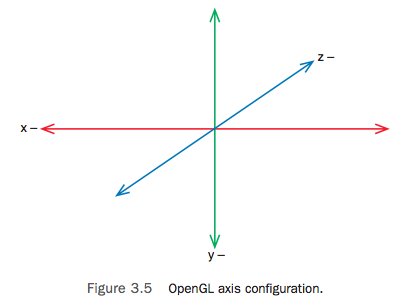
    UIKit是iPhone SDK的Cocoa Touch层的核心framework,是iPhone应用程序图形界面和事件驱动的基础,它和传统的windows桌面一样,坐标系是y轴向下的; Core Graphics(Quartz)一个基于2D的图形绘制引擎,它的坐标系则是y轴向上的;而OpenGL ES是iPhone SDK的2D和3D绘制引擎,它使用左手坐标系,它的坐标系也是y轴向上的,如果不考虑z轴,在二维下它的坐标系和Quartz是一样的。

    现在回到问题,当通过CGContextDrawImage绘制图片到一个context中时,如果传入的是UIImage的CGImageRef,因为UIKit和CG坐标系y轴相反,所以图片绘制将会上下颠倒。解决方法有以下几种,

    解决方法一:在绘制到context前通过矩阵垂直翻转坐标系

    // uiImage是将要绘制的UIImage图片,width和height是它的宽高
    CGContextTranslateCTM(context, 0, height);
    CGContextScaleCTM(context, 1.0, -1.0);
    CGContextDrawImage(context, CGRectMake(0, 0, width, height), uiImage.CGImage);
    

    解决方法二:使用UIImage的drawInRect函数,该函数内部能自动处理图片的正确方向

    // uiImage是将要绘制的UIImage图片,width和height是它的宽高
    UIGraphicsPushContext( context );
    [uiImage drawInRect:CGRectMake(0, 0, width, height)];
    UIGraphicsPopContext();
    

    解决方法三:垂直翻转投影矩阵
    这种方法通过设置上下颠倒的投影矩阵,使得原本y轴向上的GL坐标系看起来变成了y轴向下,并且坐标原点从屏幕左下角移到了屏幕左上角。如果你习惯使用y轴向下的坐标系进行二维操作,可以使用这种方法,同时原本颠倒的图片经过再次颠倒后回到了正确的方向:

    // uiImage是将要绘制的UIImage图片,width和height是它的宽高
    
    // 图片被颠倒的绘制到context
    CGContextDrawImage(context, CGRectMake(0, 0, width, height), uiImage.CGImage);
    
    // 设置上下颠倒的投影矩阵(则原来颠倒的图片回到了正确的方向)
    glMatrixMode(GL_PROJECTION);
    glLoadIdentity();
    glOrthof( 0, framebufferWidth, framebufferHeight, 0, -1, 1 );
    
    Posted in: Game Programming, iOS / Tagged: CGContextDrawImage, CoreGraphics, ios, opengles, UIKit, 上下颠倒, 坐标系, 方向

    iOS开发与OpenGL ES相关问题整理(1)

    May 22, 2011 2:21 pm / 1 Comment / Benny Chen

    在极其有限的工作日的晚上和周末进行着iOS上game programming的研究,进展非常缓慢,不过还是有必要将过程中的一些问题随时记录下来。

  • OpenGL ES崩溃在函数’glMatrixMode’

    这很有可能是因为在OpenGL ES2的context中使用OpenGL ES1的函数,ES1是固定函数渲染管线 (fixed function pipeline),而ES2是可编程的渲染管线 (programmable pipeline),ES2不再支持这些ES1的固定渲染管线的函数, 比如’glMatrixMode’。所以当ES2遇到这些不支持的ES1函数时,你的程序会收到一个’EXC_BAD_ACCESS’消息并且崩溃。通过gdb查看callstack,显示最后一个函数是gliUnimplemented:

    #0  0x0b05c0e5 in gliUnimplemented ()
    #1  0x00a1c6c3 in glMatrixMode ()
    

    如果一定要使用ES1函数, 你只能以ES1来初始化你的GL context:

    EAGLContext *aContext = [[EAGLContext alloc] initWithAPI:kEAGLRenderingAPIOpenGLES1];
    
  • 函数’pathForResource’返回nil

    需要将资源文件添加到项目的’Groups & Files’中

  • OpenGL ES崩溃在绘制函数’glDrawArrays’

    这可能是因为你启动了GL的某个渲染状态(比如vertex,color,texture coordinate等等,这里有所有可能状态的清单),但是却没有在绘制函数(比如’glDrawArray’)进行之前,设置该状态所对应的数据指针。

    比如说:

    glEnableClientState( GL_COLOR_ARRAY );
    glColorPointer( 4, GL_UNSIGNED_BYTE, 0, youColorArray );
    

    对于上面这两句代码,如果你设置了使用color数组,但是却没有设置color数组指针,在真正的绘制时你的程序就会因为找不到对应的指针而崩溃。同样的, 如果你调用了‘glEnableClientState(GL_TEXTURE_COORD_ARRAY), 则你也需要通过glTexCoordPointer()设置纹理坐标的数组指针,如此类推。

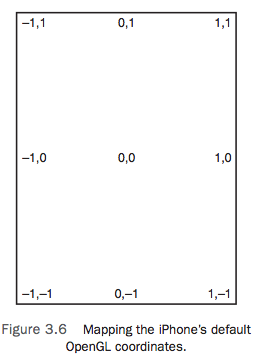
  • 怎么样通过OpenGL ES以像素为单位来绘制,而不是屏幕比例?

    在iPhone上通过OpenGL ES进行2D绘制时,默认的原点位置在屏幕中央,并且屏幕的坐标范围依次是从-1到1,不管是横轴还是纵轴。如下图所示,GL中的默认的单位1分别代表着屏幕长度和宽度的一半。

    图片来自book: ‘Learning iOS Game Programming_A Hands-On Guide to Building Your First iPhone Game’
    如果希望将原点移动到屏幕左下角,并且绘制时希望以像素为单位,只需要通过glOrthof函数将投影矩阵设置成一个垂直投影矩阵即可,代码如下:

    glMatrixMode(GL_PROJECTION);
    glLoadIdentity();
    glOrthof( 0, framebufferWidth, 0, framebufferHeight, -1, 1 );
    
  • Posted in: Game Programming, iOS / Tagged: glDrawArray, glMatrixMode, ios, opengles, pathForResource, 像素, 崩溃

    Game Framework的两种实现方式

    April 24, 2011 2:11 pm / Leave a Comment / Benny Chen

    一年多前,曾经写过一篇关于Game Engine Framework的文章,当时基本上是为了巩固并加深对framework的理解。最近又做了一些关于framework的工作,对于framework的实现方式又有了些新的认识。虽然我现在做的已经完全不是game了,不过方式对于game也同样适用。

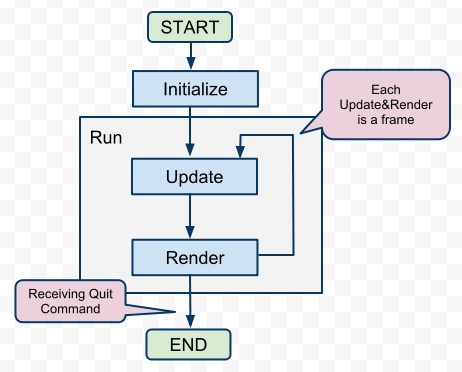
    这篇文章主要希望通过一些示例性的C++代码介绍game framework的两种实现方式。首先,我还是搬出一年多前的那篇文章里的game流程图,以下的一些代码也主要基于这张图实现。对于图的细节在这里不再赘述,可以再去翻看之前的那篇文章。

    FoC of Game

    1.通过继承

    这是一种最传统的方式了,之前我一直使用这种方式。基本上是提供一个基类,基类封装并决定了整个程序控制流,同时基于该控制流,基类提供了一系列的接口(在C++里是虚函数),以供继承类override,并实现定制化的行为。就像下面的这个Game类,run函数决定了整个程序的执行逻辑,同时initialize,update,render等非纯虚函数则提供了接口以供用户定制并实现具体Game想要的行为。

    // 通过继承来实现的framework
    class Game
    {
    public:
    	void run()
    	{
    		m_isQuit = false;
    		initialize();
    		while ( !m_isQuit ) 
    		{
    			handleInput();
    			update();
    			render();
    		}
    		destroy();
    	}
    	
    protected:
    	virtual void initialize() {}
    	virtual void update() {}
    	virtual void render() {}
    	virtual void destroy() {}
    	virtual void onMouse( Mouse mouse ) {}
    	virtual void onKeyboard( Keyboard keyboard ) {}
    	
    private:
    	void handleInput()
    	{
    		Event e;
    		while ( popEvent( &e )  )
    		{
    			switch ( e.type ) 
    			{
    			case EVENT_QUIT:
    				m_isQuit = true;
    				break;
    			case EVENT_MOUSE;
    				onMouse( e.mouse );
    				break;
    			case EVENT_KEYBOARD:
    				onKeyboard( e.keyboard );
    				break;
    			default:
    				break;
    			}
    		}
    	}
    	
    private:
    	bool m_isQuit;
    };
    

    在上面的代码中,我把实现全部写在了类的定义头文件中,在这里只是为了省事,在现实中你最好还是分开在.h和.cpp文件中。而且在这里,Game类还可以做的更多,我这里只是为了说明实现方式,所以依照前面的流程图而尽量让它简单。另外,不要纠结这段代码中的Event,Mouse,Keyboard等几个类和popEvent方法,它们只是我为了将故事说得更圆满一点而假象出来的几个类,我想你应该能猜到它们是用来干嘛的。

    基于此framework,一个具体的游戏只需要重写这些虚函数就可以了,像下面的这些代码。

    class ConcreteGame : public Game
    {
    private:
    	void initialize()
    	{
    		// do some real initialization
    	}
    	
    	void update()
    	{
    		// do some real update
    	}
    	
    	void render()
    	{
    		// do some real rendering
    	}
    
    	void destroy()
    	{
    		// do some real destroy
    	}
    	
    	void onMouse( Mouse mouse )
    	{
    		// handle mouse event
    	}
    	
    	void onKeyboard( Keyboard keyboard )
    	{
    		// handle keyboard event
    	}
    };
    
    int main()
    {
    	ConcreteGame mygame;
    	mygame.run();
    	return 0;
    }
    

    2.通过Delegation模式

    前一种方法有一个缺点,就是将程序的控制流和具体行为紧耦合在了一起,而且还必须使用继承,不易于扩展。现代软件设计的一些方法告诉我们,要尽量使用接口,且尽量使用组合而非继承。Delegation模式就可以帮我们达到这一目的。

    何为Delegation模式,wiki上的解释一语中的:

    Delegation is the simple yet powerful concept of handing a task over to another part of the program.

    Delegation将一些task委托给程序的另外一部分来处理,以达到了行为使用者和具体行为的松耦合。

    以下是通过Delegation模式重新实现的framework。

    // 通过Delegation模式来实现的framework
    class GameDelegation
    {
    public:
    	virtual void initialize() {}
    	virtual void update() {}
    	virtual void render() {}
    	virtual void destroy() {}
    	virtual void onMouse( Mouse mouse ) {}
    	virtual void onKeyboard( Keyboard keyboard ) {}
    };
    
    class Game
    {
    public:
    	Game( GameDelegation *gameDelegation )
    	{
    		m_gameDelegation = gameDelegation;
    	}
    	
    	void run()
    	{
    		m_isQuit = false;
    		if ( m_gameDelegation == NULL )
    		{
    			return;
    		}
    		
    		m_gameDelegation->initialize();
    		while ( !m_isQuit ) 
    		{
    			handleInput();
    			m_gameDelegation->update();
    			m_gameDelegation->render();
    		}
    	}
    	
    private:
    	void handleInput()
    	{
    		Event e;
    		while ( popEvent( &e ) )
    		{
    			switch ( e.type ) 
    			{
    			case EVENT_QUIT:
    				m_isQuit = true;
    				break;
    			case EVENT_MOUSE;
    				m_gameDelegation->onMouse( e.mouse );
    				break;
    			case EVENT_KEYBOARD:
    				m_gameDelegation->onKeyboard( e.keyboard );
    				break;
    			default:
    				break;
    			}
    		}
    	}
    	
    private:
    	bool m_isQuit;
    	GameDelegation *m_gameDelegation;
    };
    

    基于此framework,当需要具体实现一个游戏的时候,只需要实现GameDelegation接口即可,然后将Game类的GameDelegation设置为你所实现的具体的ConcreteGameDelegation类,代码如下。

    class ConcreteGameDelegation : public GameDelegation
    {
    public:
    	void initialize()
    	{
    		// do some real initialization
    	}
    	
    	void update()
    	{
    		// do some real update
    	}
    	
    	void render()
    	{
    		// do some real rendering
    	}
    
    	void destroy()
    	{
    		// do some real destroy
    	}
    	
    	void onMouse( Mouse mouse )
    	{
    		// handle mouse event
    	}
    	
    	void onKeyboard( Keyboard keyboard )
    	{
    		// handle keyboard event
    	}
    };
    
    int main()
    {
    	ConcreteGameDelegation myGameDelegation;
    	Game mygame( &myGameDelegation );
    	mygame.run();
    	return 0;
    }
    

    最近我正好做了一些iOS上开发的研究,发现Delegation在iOS框架中被普遍使用。比如,iOS中的每个应用程序对应的是一个UIApplication类,为每一个UIApplication,开发人员必须要实现一个特定的UIApplicationDelegate,并将它指定给当前的应用程序(在main函数中通过UIApplicationMain函数指定,或者是在nib文件中绑定)。在这个UIApplicationDelegate类中,开发人员就需要重写诸如didFinishLaunchingWithOptions,applicationWillTerminate这样的方法,就类似与上面game framework中的initialize,destroy等方法。当然iOS框架要复杂很多,它还用到其它一系列的设计模式,有空研究些这样设计是非常有趣的。

    图片来自于这篇苹果官方关于iOS中delegation的介绍:http://developer.apple.com/library/ios/#documentation/General/Conceptual/DevPedia-CocoaCore/Delegation.html

    Posted in: C++, Game Programming, iOS / Tagged: C++, delegation, framework, game, 实现, 继承

    Simulator无法运行OpenGL ES程序

    April 23, 2011 9:32 pm / 4 Comments / Benny Chen

    新买了MBP,在上面下载并安装了Xcode3.2.6,终于算是迈出iOS game development的第一步。由于现在工作已经基本跟game毫不相干,只有周末才有时间搞点自己的研究了:-(

    在Xcode里新建第一个项目,基于模板“OpenGL ES Application”。不用写任何一行代码,iOS SDK已经为我们创建了一个可以运行的OpenGL应用程序了。从工具栏上点击“Build and Run”(或者通过command+return快捷键),试图启动运行程序。但诡异的是,无论怎样,程序都是一启动,闪动一下就退出了。

    打开console(菜单->Run->Console),报出一大串的错误:

    LLVM ERROR: Cannot yet select: 0x900cd10: v4i32 = bit_convert 0x9013b50 [ORD=129] [ID=69]
    ……
    ……
    Failed to launch simulated application: Unknown error.

    由于完全是个iOS新兵,花了好一段周折才解决,解决办法:

    1.从Groups&Files的Targets下选择你的项目的target;
    2.从工具栏点击“info”按钮,设置target属性;
    3.将Build->Deployment->iOS Deployment Target从iOS 4.3改为iOS 4.2;
    4.回到Xcode主界面,从工具栏的Overview下拉列表中,可以发现,多出了simulator 4.2的项(原来只有4.3),勾选iPhone Simulator 4.2或者iPhone Simulator 4.3;
    5.再次运行程序,跳动的彩色小方块终于出来了。

    在Project的info中也可以设置iOS Deployment Target,但是在target level设置的优先级会更高,且一个项目可以有多个target。

    这应该是Apple的一个bug,iOS4.3太新了。不过这个错误只有OpenGLES的程序才会有,普通程序没有这个错误。Apple每更新一个新版本的iOS,对于开发人员来说,我想或多或少都会带来一定程度的pain。

    Posted in: iOS / Tagged: LLVM ERROR, opengles, simulator, xcode, 不能运行

    Bob Dylan真的来了

    April 5, 2011 10:49 pm / Leave a Comment / Benny Chen

    Bob Dylan & Joan Baez
    无论原来自己多么的不信,不过这回真的是真的,迪伦大爷真的来了。

    美国60年代的文化和音乐一直让我着迷,而迪伦正是那个时代的代表之一。如今,这个和Beatles同一时代的音乐巨匠已经年过70岁了,他才第一次将要登上中国的舞台,明晚,就在工体。如果是迪伦的歌迷,估计这是第一次,也是最后一次了。我算不上一个真正的歌迷,因为我承认我听不懂迪伦的很多歌曲,但是我还是很崇拜这样一位神一样的人物,所以,明晚,我要去膜拜他。

    迪伦的歌我听过很多,最喜欢的有这些:

    Blowing in the Wind
    Knockin’ on Heaven’s Door
    You Belong to Me
    I Want You
    Mr. Tumbourine Man
    Forever Young
    Like a Rolling Stone

    晒晒我的票:-)

    Posted in: Music Heaven / Tagged: Beijing, bob, concert, dylan, 北京, 演唱会, 迪伦

    Post Navigation

    ← Older Posts
    Newer Posts →

    LinkedIn

    Milan Petrovic

    Categories

    • In My Life (25)
      • A Day in the Life (8)
      • English Learning (2)
      • Learn a Word (7)
      • Something In The Way (8)
    • Music Heaven (8)
      • Guitar (1)
      • In Concert (1)
      • Lyrics (3)
    • OK Computer (54)
      • 3D (3)
      • C++ (10)
      • Computer Graphics (15)
      • Game Programming (23)
      • iOS (6)
      • Linux (1)
      • Lua (9)
      • My Projects (3)
      • Some Experiences (9)
      • Talking in Code (2)
      • Unity (2)
    • Quotations (2)
    • Uncategorized (1)
    • Visca Barça (24)
      • FCB BJ (5)

    Recent Posts

    • [译]优化你的手机游戏(没有延迟的,才是健康的)- 一篇给游戏美术设计师读的文章
    • 新浪微博API for MOAI
    • 稍后继续
    • Unity Developer ++
    • Another Thread @ Moai Forum
    • 1st Day of Golden Week
    • 为SyntaxHighlighter添加新语言
    • 基于Lua的State Pattern
    • Class Diagram of Pacman
    • 基于Moai的Pacman

    Recent Comments

    • 约修亚_RK on 为SyntaxHighlighter添加新语言
    • 爱装的小男孩 on 小心DLL链接静态库时的内存错误
    • happyfire on Game Loop的几种实现方式
    • William on 新浪微博API for MOAI
    • Benny Chen on 新浪微博API for MOAI
    • your man on 新浪微博API for MOAI
    • 你家男人 on 稍后继续
    • 逍遥 on 关于对std::vector的遍历
    • papa on Unity Developer ++
    • T客网 ︱ Techpot » Blog Archive » iOS开发与OpenGL ES相关问题整理(1) on iOS开发与OpenGL ES相关问题整理(1)

    Tags

    2d 3D 3dsmax 3ds max air Apply architecture Asia tour barca Beijing bilbao binary search blocked bob boost bruce springsteen C++ capo CGContextDrawImage Champions League Change DLL DX10 eval exporter flash framework frustum culling game game engine iniesta ios linux lua Moai opengles pacman plug-in plugin 北京 导出插件 崩溃 巴萨 游戏引擎 踢球
    © Copyright 2026 - A Game Developer
    Infinity Theme by DesignCoral / WordPress